One Crew View Per Truck: What the Loader Actually Sees Now
Multi-truck packing landed in v0.10, and the change that matters is downstream: crew view and PDF export now generate per container, with their own checklist, checkbox state and weight readout per truck.

Multi-truck packing shipped in v0.10, and the interesting part is not the packing space. It is what happens downstream, on the dock, at 6am, when the person holding the phone is not the person who built the pack. A split pack used to collapse into a single crew view: one link, one numbered checklist, every case in the pack sitting on it no matter which truck it was going into. That works fine when a pack means a truck. It stops working the moment a pack means four.
The old shape, and why it broke
Crew View has always been the read-only, no-account-needed version of a pack. Our own docs still describe it the original way: top-down and side-view diagrams with labeled case positions, a case checklist with a numbered loading sequence and checkboxes, a weight tracker showing total weight against capacity, a notes section, and a share button. All of that is still true. The assumption underneath it is what changed.
The assumption was one pack, one container. Break a load across four trucks under that model and the loader working truck 3 scrolls past sixty cases that are not theirs to find the ones that are. The weight tracker reads for the whole pack, which tells you nothing about whether truck 3 is the one running heavy. Worst of all, the checkbox state is shared, so a driver ticking off a case on truck 1 marks it loaded for a crew standing at a different dock door who never saw it.
What v0.10 actually changed
Crew View and the PDF export now generate per container. The container picker sits in the Crew View header, so you switch trucks without leaving the view, and the header reads out weight capacity used for the container you are looking at rather than for the pack as a whole. Each container carries its own checklist: its own order, its own lock, its own resort, its own checked-off state. Check a case off on truck 2 and truck 1's crew sees nothing move.
View All is still there when you want the whole load on one screen, and it now groups the checklist by container instead of running everything together. Notes stay pack-wide on purpose, so the one paragraph about the load-out gate or the forklift being on the wrong side of the building follows every truck instead of getting retyped four times.
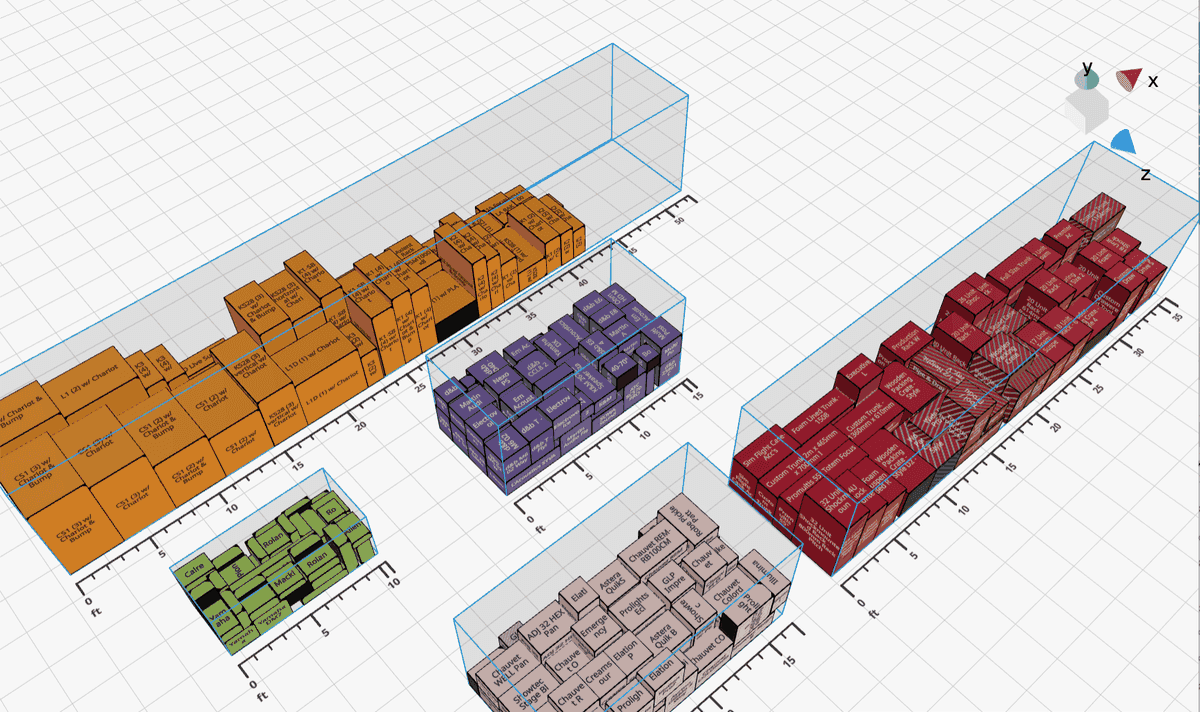
One pack, four containers. Each one now generates its own crew view.
The rule that will bite you exactly once
One change is worth reading twice: cases now have to be explicitly assigned to a container to show up in the crew view or the PDF export. Before, anything sitting in the packing space made the list. Now a case that is not packed into a truck lands in an Unpacked group in View All and nowhere else. That sounds like a papercut until the first time you build a four-truck pack and discover seven cases you never assigned, which is a much better problem to have on a laptop than in a parking lot.
The new Loading Dock inspector is where you fix it. It lists every entity in the pack alongside the container it is packed into, so "where did the sub carts end up" is one panel instead of a hunt through the 3D space.
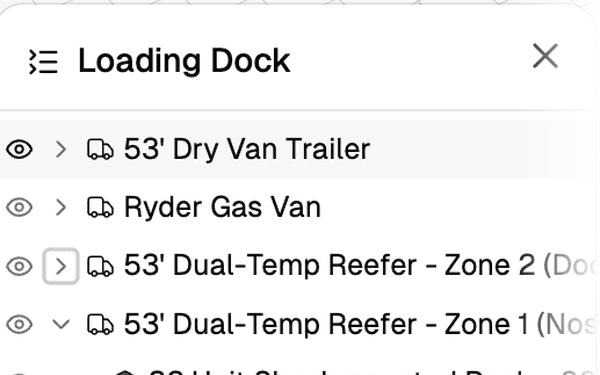
The Loading Dock inspector: every entity in the pack and the container it is packed into.
What it changes on a dock
The practical version: you send one link per truck. Truck 1's loader gets truck 1's checklist, truck 1's diagrams, and truck 1's weight against truck 1's capacity. Nobody scrolls past someone else's gear. Nobody checks off a case they cannot see. When the split changes at 2am because the video wall got cut, you reassign the cases in the app and every crew view moves with it, because the link points at the container rather than at a PDF somebody printed on Tuesday.
The per-truck weight readout is the underrated piece. On a split load, gross weight across the whole pack is close to useless as a planning number. What you need to know is which truck is the one that will weigh heavy at the scale, and the header now answers that per container instead of making you do the subtraction in your head.
Where the docs are
Behind, honestly. The public changelog still tops out at v0.9.8 from August 1, and the docs page still describes Crew View as one read-only pack with one numbered checklist. That is accurate for a single-container pack, which is still most packs most of the time. It is no longer the whole story. The rewrite is in progress, and until it lands, this post is the documentation.
Ready to split your next load across trucks? Log in to Truck Packer and build the pack.

