How to Choose Warehouse Management Software: A Practical Guide for Operations Managers
Truck Packer is one of the many solutions to warehouse management systems. Let's dive into what it looks like picking the right system for your team.

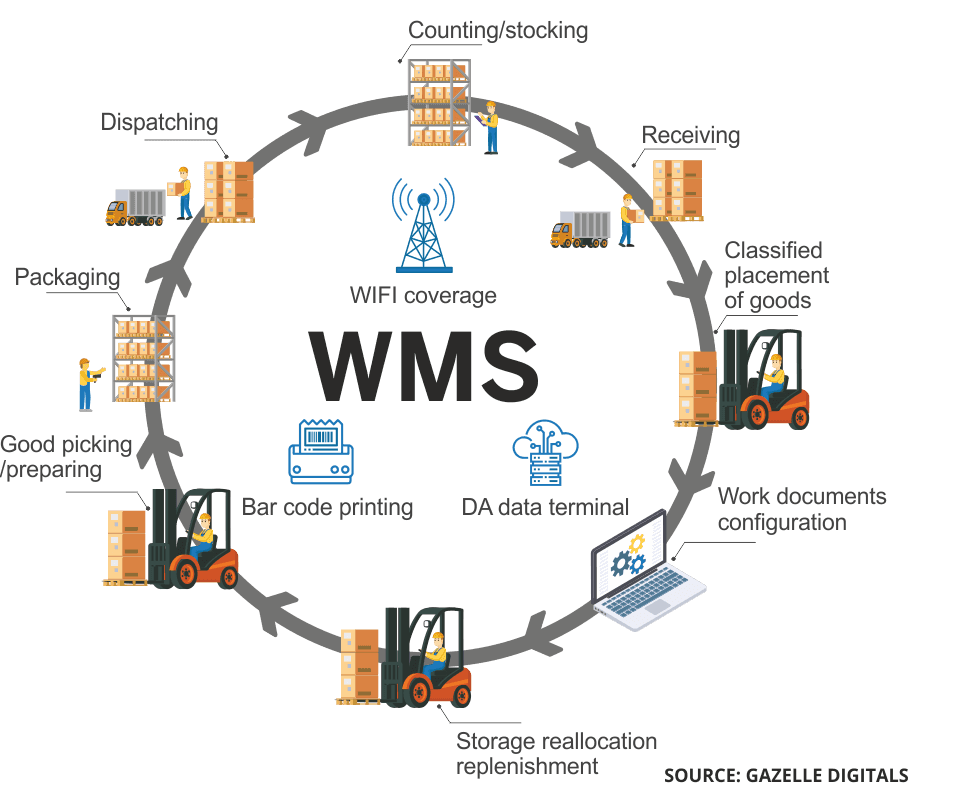
Finding the right WMS for your warehouse doesn't have to be overwhelming. This guide breaks down what actually matters—and reveals the critical capability most solutions miss.
What Is Warehouse Management Software?
Warehouse management software (WMS) is the digital backbone of modern warehouse operations. It tracks inventory, coordinates order fulfillment, and provides visibility across your entire operation—from receiving to shipping.
But here's what most buyers don't realize: the scope of WMS varies dramatically between solutions. Some handle everything from yard management to labor scheduling. Others focus narrowly on inventory tracking. Understanding what you actually need is the first step to making a smart investment.
The Core Features Every WMS Should Have
Before evaluating specific vendors, make sure any solution you consider includes these fundamentals:
Inventory Tracking and Visibility
Real-time inventory accuracy is non-negotiable. Your WMS should show exactly what you have, where it's located, and when it's moving. Look for:
- Lot and serial number tracking
- Multiple location support (bins, zones, warehouses)
- Cycle counting capabilities
- Low-stock alerts and reorder triggers
Order Management
From pick tickets to packing slips, your WMS should streamline the entire fulfillment process. Key capabilities include:
- Wave and batch picking optimization
- Pick path efficiency (minimizing travel time)
- Packing verification and quality checks
- Automated shipping label generation
Receiving and Putaway
Getting inventory into your system accurately sets the tone for everything downstream. Evaluate:
- ASN (Advanced Shipping Notice) support
- Barcode and RFID scanning on receipt
- Directed putaway based on velocity, size, or custom rules
- Cross-docking capabilities if relevant to your operation
Reporting and Analytics
You can't improve what you don't measure. Your WMS should provide:
- Real-time KPI dashboards
- Customizable reports
- Historical trend analysis
- Labor productivity metrics
Beyond the Basics: Features That Separate Good from Great
Once you've confirmed the fundamentals, these advanced capabilities often make the difference between a WMS that works and one that transforms your operation.
Integration Capabilities
Your WMS doesn't operate in isolation. It needs to communicate with:
- ERP systems for financial and procurement data
- E-commerce platforms for order flow
- Shipping carriers for rate shopping and label printing
- Automation systems like conveyors, sortation, and robotics
Ask vendors about pre-built integrations versus custom API work. Pre-built connections save significant implementation time and cost.
Mobile and Cloud Accessibility
Modern operations require flexibility. Cloud-based WMS solutions offer:
- Lower upfront costs
- Automatic updates and maintenance
- Access from any device, anywhere
- Easier scaling as you grow
Mobile capabilities for floor staff—scanning, picking, and receiving from handheld devices—are now standard expectations, not premium features.
Scalability
Your WMS should grow with your business. Consider:
- Can it handle 10x your current order volume?
- Does pricing scale reasonably, or do costs spike at certain thresholds?
- Can you add warehouses or sales channels without a major overhaul?
The Gap Most WMS Solutions Leave Wide Open
Here's something that surprises many warehouse managers during their software search: most WMS solutions stop at the dock door.
Think about your current workflow. Your WMS might excel at telling you what to pick, how to pack it, and which carrier to use. But when it comes to actually loading the truck—maximizing space utilization, ensuring weight distribution, and visualizing how everything fits—you're often on your own.
This is the truck loading gap, and it costs operations real money:
- Wasted space means more shipments and higher freight costs
- Poor weight distribution creates safety issues and compliance problems
- Manual load planning eats up time that could be spent on higher-value tasks
- Errors in loading sequences lead to damaged goods and returns
Traditional WMS platforms treat shipping as the end of their responsibility. But the reality is that getting goods into the truck efficiently is just as critical as getting them to the dock.
Solving the Truck Loading Problem
This is where specialized load planning tools come in. Truck Packer, for example, fills this exact gap. It lets teams:
- Auto-pack inventory into optimized 3D load plans in seconds
- Visualize weight distribution to avoid hot spots and compliance issues
- Export professional manifests with overhead, side, and front views
- Plan loads collaboratively without CAD or technical expertise
The interface is intuitive enough that anyone can use it—no drafting experience required. You upload your inventory via CSV or enter dimensions manually, hit the auto-pack button, and refine as needed with snap-to-place controls.
For operations where every cubic foot matters—AV rentals, touring productions, event logistics, and freight consolidation—this kind of tool pays for itself quickly in reduced shipments and faster load times.
How to Evaluate WMS During a Demo
Vendors will always show their software in the best possible light. Here's how to cut through the polish and assess what really matters.
Bring Your Own Data
Ask if you can load your actual inventory data or order history into the demo environment. Seeing the software work with your SKU counts, order volumes, and warehouse layout reveals performance issues that canned demos hide.
Test the Unhappy Path
Demo scripts focus on everything going right. Ask to see what happens when things go wrong. How does the system handle a mis-pick? What about a damaged item discovered during packing? How are inventory discrepancies resolved? The answers reveal how much time your team will spend troubleshooting versus working.
Involve Your Floor Staff
Bring a warehouse associate or supervisor to the demo—someone who will actually use the system daily. Watch their reaction. If they're confused or overwhelmed, that's a signal about training requirements and adoption challenges ahead.
Ask About the Worst Implementation They've Had
Every vendor has horror stories. Asking about their most challenging implementation—and how they handled it—tells you a lot about their support philosophy and problem-solving approach.
Questions to Ask Every WMS Vendor
Arm yourself with these questions during demos and sales calls:
- What's included in the base price versus add-on modules? Many vendors advertise low starting prices but essential features cost extra.
- How long does typical implementation take? Be wary of promises that sound too good. Complex implementations often take 3-6 months.
- What does ongoing support look like? Understand response times, support hours, and whether phone support costs extra.
- Can I see a reference customer in my industry? Talking to actual users reveals insights no demo can provide.
- How do you handle the shipping and loading process? This question often exposes where the solution's capabilities end.
Red Flags to Watch For
Avoid vendors who:
- Can't provide clear, written pricing
- Require multi-year contracts with no early termination clause
- Have poor reviews specifically about implementation or support
- Demonstrate only in controlled environments rather than realistic scenarios
- Dismiss your questions about integration or specific workflows
Setting Yourself Up for Implementation Success
Selecting the right WMS is only half the battle. How you implement it determines whether you see ROI in months or years.
Start with Clean Data
Garbage in, garbage out. Before go-live, audit your inventory data, location codes, and item masters. Fixing data issues during implementation is far cheaper than troubleshooting them in production.
Plan for Parallel Operation
Don't flip the switch overnight. Run your old system alongside the new WMS for at least two weeks. This catches issues before they become emergencies and gives your team confidence in the new processes.
Invest in Training
Underfunding training is the most common implementation mistake. Budget for initial training, refresher sessions after 90 days, and documentation your team can reference independently. The vendor's standard training package is rarely enough.
Define Success Metrics Early
Know what "working" looks like before you start. Whether it's pick accuracy, orders per hour, or inventory turns, establishing baseline metrics lets you prove ROI and identify areas needing attention.
Making Your Final Decision
Choosing warehouse management software is a significant decision, but it doesn't have to be paralyzing. Focus on:
- Must-have features that address your specific pain points
- Integration requirements with your existing tech stack
- Total cost of ownership including implementation, training, and ongoing fees
- Vendor stability and support quality
- Gap coverage for critical processes like load optimization that many solutions overlook
The best WMS for your operation is the one that fits your workflow today and can scale with you tomorrow—while working alongside specialized tools that handle what it can't.
Looking to optimize your truck loading process? Truck Packer helps teams auto-pack, visualize, and export accurate load plans in seconds. No complex software required.
Stop reading, start packing: log in to Truck Packer and lay out your trailer.

